Tutorial 3: Live Data & Background Work
A frame must finish quickly. Searching a database, downloading a file, or waiting for a sensor cannot happen inside the view, or the window stops responding while the work runs. nano-ui moves that work to worker threads behind two handles, Task and Stream, and wakes the frame loop when there is something new to draw.
This tutorial builds three small panes from packages/nano-ui-demo/examples/Tasks.hs plus the live chart from LiveChart.hs. Run them with:
cabal run nano-ui-example-tasks
cabal run nano-ui-example-live-chart
Important
Compile with
-threaded. The frame loop sleeps while a job runs, and the job runs on a Haskell thread while the loop is blocked.
1. Allocate handles once
A Task runs one typed job; a Stream carries one typed push channel. Both are created during setup, like a Var:
-- | One handle per job. The types fix each job's key and result.
data App = App
  { appSearch :: !(Task Text [Text])
  , appFlaky :: !(Task Int Text)
  , appProgress :: !(Stream () Int)
  }

newApp :: IO App
newApp = App <$> newTask <*> newTask <*> newStream
The handle fixes the key and result types, so a task cannot be reused for a different job.
2. A background search
The query field is debounced: searchInput' reports respChanged once typing pauses, not on every keystroke. The committed query becomes the task’s key:
searchCard :: App -> NanoUI ()
searchCard app = do
  query <- useVar ""
  committed <- useVar ""
  resp <- searchInput' "Find a word" query
  -- searchInput' reports a change once typing pauses, so a fast typist
  -- starts one job, not one per keystroke. Keying by the query itself would
  -- also work; each new key would just kill the job before it.
  when (respChanged resp) (writeVar committed =<< readVar query)
  key <- readVar committed
  status <- useTaskStatus (appSearch app) key (slowSearch key)
  -- While a new query runs, TaskRunning carries the previous results, so
  -- the list stays put instead of flashing empty.
  let
    (hits, running) = case status of
      TaskRunning previous -> (fromMaybe [] previous, True)
      TaskDone found -> (found, False)
      TaskFailed _ previous -> (fromMaybe [] previous, False)
  rowWith (tight . gap 8 . alignMid) $ do
    -- The spinner comes and goes, so it sits in a scope: the label after it
    -- keeps its widget id either way.
    scope (when running spinner)
    muted
      ( T.pack (show (length hits))
          <> " matches"
          <> if running then " (searching...)" else ""
      )
  rowWith (wrap . gap 6 . fillW) $
    forM_ (take 24 hits) $
      \w -> withKey w (label w)
slowSearch is ordinary blocking IO:
slowSearch :: Text -> IO [Text]
slowSearch q = do
  threadDelay 500000
  let
    found = filter (T.isInfixOf (T.toLower q)) wordList
  length found `seq` pure found
What the loop does with it:
- The first frame calls
useTaskStatuswith a new key, which starts a worker thread. - Later frames return immediately.
TaskRunning previouscarries the last completed result, so the list does not flash empty when a new query starts. - The worker finishes and wakes the loop for a frame. The next call reports
TaskDone. - Changing the key (typing a new committed query) cancels the old worker with an asynchronous exception and starts the new one.
When only the latest result matters, use useTask:
fileView :: App -> Text -> NanoUI ()
fileView app path = do
  contents <- useTask (appFile app) path (T.readFile (T.unpack path))
  label (fromMaybe "Loading..." contents)
3. Retrying a failed job
A job that throws becomes TaskFailed err previous. The exception is shown and the key includes an attempt counter, so pressing Retry reruns the same input:
flakyCard :: App -> NanoUI ()
flakyCard app = do
  attemptVar <- useVar (0 :: Int)
  attempt <- readVar attemptVar
  -- Same input every time, so the attempt number is the key: bumping it is
  -- what reruns the job.
  status <- useTaskStatus (appFlaky app) attempt (flakyRequest attempt)
  -- Each branch declares different widgets, so the whole case is one scope.
  scope $ case status of
    TaskRunning _ -> rowWith (tight . gap 8 . alignMid) $ do
      spinner
      label "Contacting the server..."
    TaskDone reply -> rowWith (tight . gap 8 . alignMid) $ do
      label reply
      whenM (button "Run again") (modifyVar attemptVar (+ 1))
    TaskFailed err _ -> rowWith (tight . gap 8 . alignMid) $ do
      danger (T.pack (displayException err))
      whenM (button "Retry") (modifyVar attemptVar (+ 1))
Two rules are visible here:
- The key must change to rerun. Keying by the input alone would never restart an identical request, so the attempt number is part of the key.
- Each branch is a whole
scope. The branches declare different widgets, and the scope keeps the widget ids after the card stable as the status changes.
Cancellation is an asynchronous exception, so acquire resources inside the job with bracket:
job :: Text -> IO [Text]
job q = bracket (connect info) disconnect $ \conn -> runQuery conn q
4. Streams: many updates, one frame
A Stream is for work that pushes many times per job: progress ticks, sensor readings, tokens from a model. Its producer receives update and runs until it returns or is cancelled:
progressCard :: App -> NanoUI ()
progressCard app = do
  running <- useVar False
  checkbox "Run" running
  isRunning <- readVar running
  -- When "Run" is unticked 'useStream' is not called, and that alone kills
  -- the producer: there is no stop button to wire up. Ticking it again
  -- starts a fresh producer from the initial value. The scope keeps
  -- anything declared after it on stable ids.
  scope $ when isRunning $ do
    pct <- useStream (appProgress app) () (0 :: Int) $ \update ->
      forM_ [1 .. 100] $ \i -> do
        threadDelay 50000
        -- Each update wakes the loop for one frame; updates that arrive
        -- between frames share it.
        update (const i)
    progressBar (fromIntegral pct / 100)
    muted
      ( if pct >= 100
          then "Done. Untick and tick Run to start over."
          else T.pack (show pct) <> "%"
      )
- To stop the stream, stop calling the hook. When
isRunningis false,useStreamis not called, and the producer is cancelled. - Updates coalesce. If the producer pushes five values between two frames, one frame runs and draws the latest value.
- The stream’s state starts from the initial value. Restarting after a pause begins at
0here, which is why the label explains how to start over. To resume from the last state, save it outside and pass it as the initial value (the live chart below does this). - Keep the hook outside tabs when the stream must keep running. Like a task, a stream is released when its hook is skipped for a whole frame.
A paused progress pane costs no frames.
5. A live chart
A Stream feeds the chart through a PlotCache. The cache is allocated once and passed to plot, which compares the chart with the one stored in the cache and rebuilds the diagram only when the data or theme changes:
data App = App
  { appFeed :: !(Stream () Feed)
  , appSaved :: !(Var Feed)
  , appPlots :: !PlotCache
  }

newApp :: IO App
newApp = App <$> newStream <*> newVar emptyFeed <*> newPlotCache
The view pauses by not calling the stream, and resumes from the saved feed:
view :: App -> NanoUI ()
view app = columnWith (padAll 16 . gap 12 . grow) $ do
  running <- useVar True
  isRunning <- readVar running
  saved <- readVar (appSaved app)
  -- While running, the stream is the source of truth; 'saved' only seeds a
  -- restarted producer and is ignored after its first frame. While paused,
  -- 'useStream' is not called and the saved samples are shown instead.
  feed <-
    scope $
      if isRunning
        then useStream (appFeed app) () saved $ \update -> forever $ do
          threadDelay 100000
          update advance
        else pure saved

  rowWith (tight . gap 8 . alignMid . fillW) $ do
    whenM (button (if isRunning then "Pause" else "Resume")) $ do
      when isRunning (writeVar (appSaved app) feed)
      writeVar running (not isRunning)
    muted
      (if isRunning then "Live: a sample every 100 ms" else "Paused: the loop is idle")

  let
    points = feedPoints feed
  -- A crosshair for reading values off the plot; the response reports the
  -- sample nearest the pointer.
  resp <-
    withCursorShape
      UiCursorCrosshair
      (plot (appPlots app) (fillW . minH 300) (walkChart points))

  rowWith (tight . gap 16 . alignMid . fillW) $ do
    let
      ys = fmap snd points
    -- Both parts come and go, so each sits in a scope.
    scope $
      if Seq.null ys
        then muted "Waiting for the first sample..."
        else do
          kv "min" (fmt (minimum ys))
          kv "max" (fmt (maximum ys))
          kv "last" (fmt (feedLevel feed))
    scope . for_ (plotHover resp) $ \hover ->
      kv
        "cursor"
        ( "#"
            <> T.pack (show (round (hoverDataX hover) :: Int))
            <> " = "
            <> fmt (hoverDataY hover)
        )
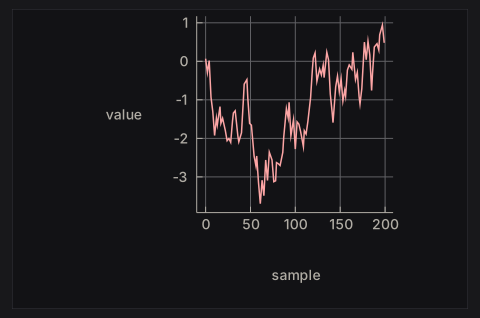
Feed, advance, and fmt are in LiveChart.hs; walkChart builds the chart value:
walkChart :: Seq (Double, Double) -> Chart
walkChart points =
  withGrid GridBoth
    . withLegend LegendNone
    . withXAxis "sample"
    . withYAxis "value" $
    chart [line "walk" points]
This is the chart after its first 200 samples, when the window is full:
The chart API is small:
line,scatter,bar,area, andstepbuild series from points (or category/value pairs for bars).charttakes the list of series;withGrid,withLegend,withXAxis,withYAxis, andwithTitledecorate it.plot cache layout theChartdraws it and returns aPlotResponsewhoseplotHoveris the nearest data point under the pointer.
Building the Chart value every frame is cheap: it is a plain value, and comparing a few hundred points costs little. Rebuilding the diagram is expensive, and the PlotCache skips it when the chart and theme are unchanged.
6. Try it
- Add a search that runs on every keystroke (key by the query) and compare the cancellation behaviour with
searchInput'. - Stream markdown tokens into
NanoUI.Markdownand append them incrementally (see Ecosystem Packages). - Virtualize a 100,000-row log list using
getScrollMetricsUi(see Layout & Scrolling and theLogs.hsexample). - Replace the streamed chart with a
Taskthat loads a whole dataset once.
The full lifecycle reference is Async Work & Animation.